Learning Objectives: Learn how to change computers IP address and connect them to “B” network or a “C” network.
Equipment list: Computers, Ethernet Cable, Switch, Router
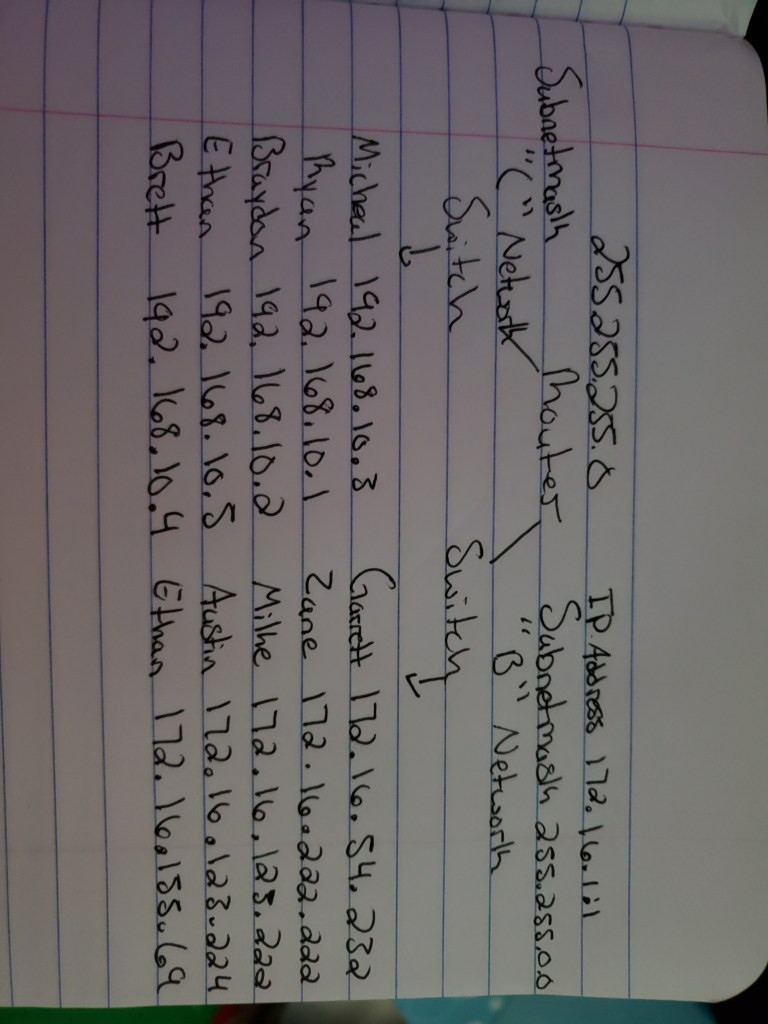
Notes, Observation, and Questions: In this lab I noticed that on a “B” network all of the numbers on a ip address are the same except the last bit, where as a “C” network all numbers are the same except the last two bits. When changing the IP addresses we came to a problem with my laptop, everyone was able to ping off of each other but for some reason my laptop was not being found. After some troubleshooting we found that I needed to disable my windows defender in order for my laptop to be on the network we created.
Diagrams, flowcharts, and figures:
References: Lab 5 Handout
Conclusions: In lab today we separated into two different groups and created two different networks. One team created a “C” network and the other team created a “B” network. We created these networks by changing our IP addresses to correspond with one another and link our computer into a switch. After the class had created two networks we used a router in between us to link our networks together. Once connected to the router everyone was able to ping off of each other meaning the we had created one large network from two small ones. The lab was a success.
 Garrett Smith's CMST 250 Lab Reports